Configure the VPN Gateway
Once the VPN Gateway is Active, this page walks through configuring the IPsec connection to a remote peer.
Step 1. Open the Connection configuration dialog
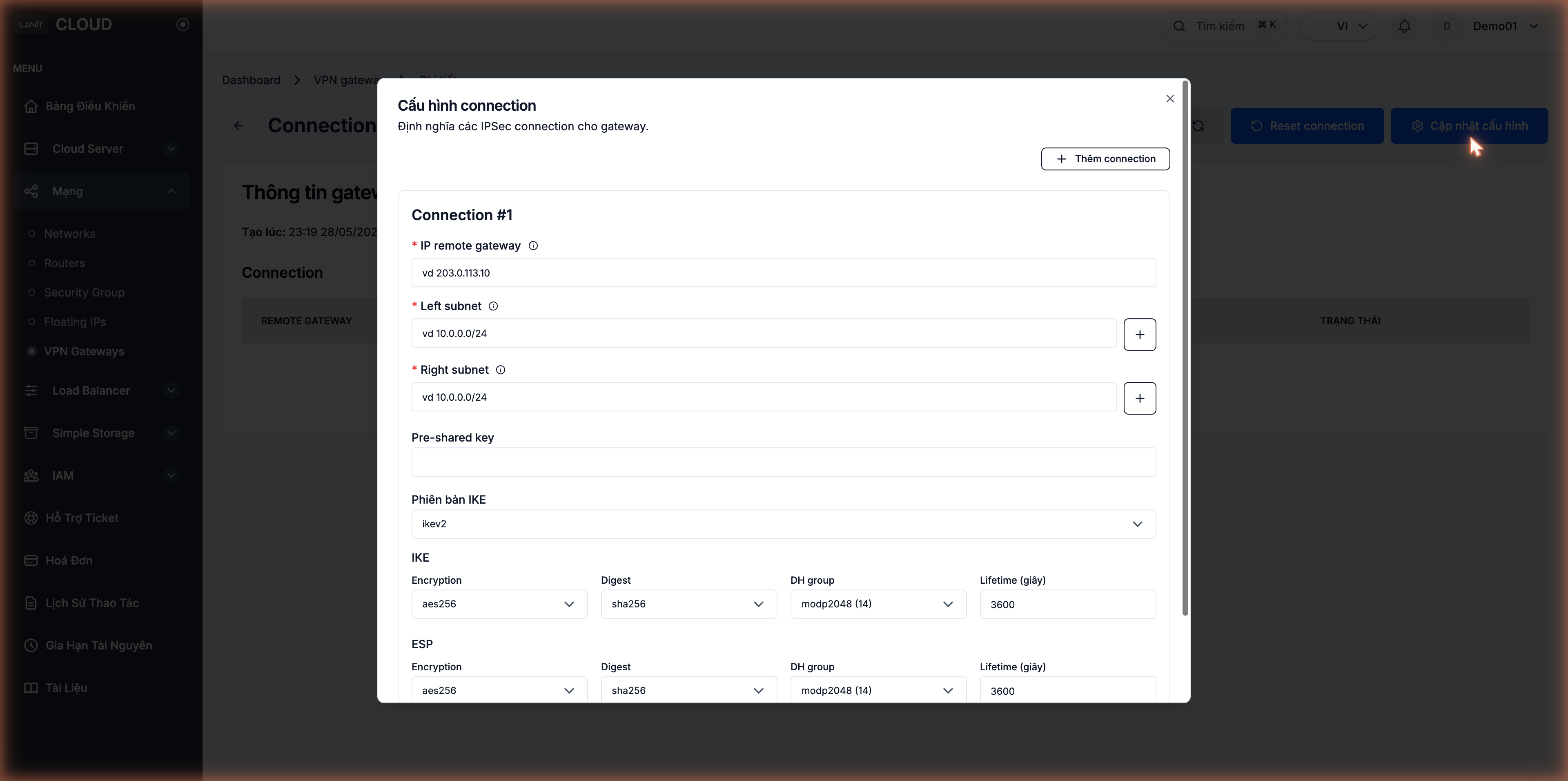
On the VPN Gateway detail page, click Update configuration. The Connection configuration dialog opens — define IPsec connections for the gateway. Each tunnel is a Connection #N. Click + Add connection in the top-right to add another tunnel.
Step 2. Endpoints and subnets
| Field | Meaning | Example |
|---|---|---|
| IP remote gateway (required) | Public IP of the peer's gateway | 203.0.113.10 |
| Left subnet (required) | CIDR on this side (LANIT) | 10.0.0.0/24 |
| Right subnet (required) | CIDR on the remote side | 192.168.1.0/24 |
| Pre-shared key | PSK shared with the peer | <PSK >= 32 random characters> |
Both Left and Right subnet support multiple ranges — click the + button on the right of the field to add another range (e.g. LANIT has two subnets 10.0.1.0/24 and 10.0.2.0/24 going through the same tunnel).
Generate a safe Pre-shared Key
# 32 random characters — sufficient entropy
openssl rand -base64 32
Don't use PSKs built from dictionary words or guessable patterns. Don't reuse PSKs across connections.
Step 3. IKE version
LANIT Cloud supports IKEv2 only — aligned with modern security recommendations and supported by virtually every modern peer.
Step 4. IKE (Phase 1) — Key Exchange
| Parameter | Default | Available options |
|---|---|---|
| Encryption | aes256 | aes128, aes192, aes256, 3des |
| Digest | sha256 | sha1, sha256, sha384, sha512, md5 |
| DH group | modp2048 (14) | modp1024 (2), modp1536 (5), modp2048 (14), modp3072 (15), modp4096 (16), modp6144 (17), modp8192 (18) |
| Lifetime (seconds) | 3600 (1 hour) | Integer |
Step 5. ESP (Phase 2) — Data Encryption
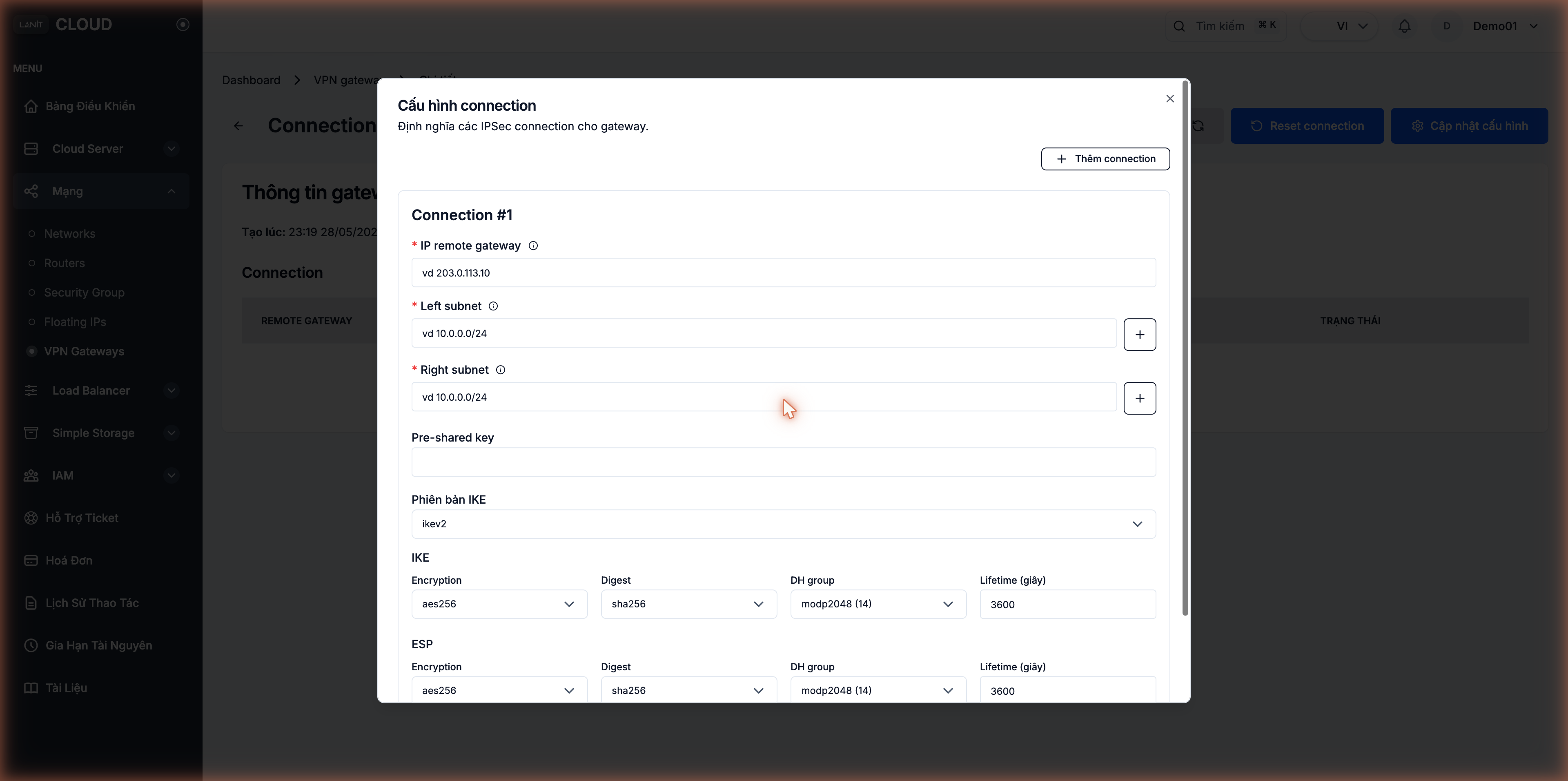
Same parameter set as IKE but applied to the actual data packets after the tunnel is up.
| Parameter | Default | Available options |
|---|---|---|
| Encryption | aes256 | aes128, aes192, aes256, 3des |
| Digest | sha256 | sha1, sha256, sha384, sha512, md5 |
| DH group | modp2048 (14) | modp1024 (2) ... modp8192 (18) |
| Lifetime (seconds) | 3600 (1 hour) | Integer |
Recommended security settings
| Priority | Parameter | Value |
|---|---|---|
| Good | Encryption | aes256 |
| Good | Digest | sha256 or higher |
| Good | DH group | modp2048 (14) or higher |
| Good | IKE Lifetime | 86400 (24 hours) — reduces rekey frequency |
| Good | ESP Lifetime | 28800 (8 hours) |
| Avoid | Encryption | 3des — weak, deprecated |
| Avoid | Digest | md5, sha1 — collision-broken |
| Avoid | DH group | modp1024 (2), modp1536 (5) — weak against modern attackers |
Step 6. Click Confirm
Once Connection #1 (and any additional Connection #N entries) is complete, click Confirm. The portal saves the configuration and applies it. The tunnel transitions to Connected once the remote peer is also up.
Step 7. Configure the remote peer
The remote (on-premise) side must be configured mirroring the LANIT side:
| LANIT field | ↔ | Peer field | Notes |
|---|---|---|---|
Gateway Public IP (e.g. 161.248.199.97) | ↔ | Remote Peer IP | Read it from the gateway detail page |
Left subnet 10.0.0.0/24 | ↔ | Remote Subnets | From the peer's perspective, LANIT is the remote |
Right subnet 192.168.1.0/24 | ↔ | Local Subnets | |
| Pre-shared key | ↔ | Pre-shared key | Must be identical |
| IKEv2 | ↔ | IKE v2 | Must match |
| IKE: aes256/sha256/modp2048/3600 | ↔ | Phase 1: must match all | |
| ESP: aes256/sha256/modp2048/3600 | ↔ | Phase 2: must match all |
Example peer configurations
strongSwan (Linux, /etc/ipsec.conf)
conn lanit-cloud
    keyexchange=ikev2
    left=%defaultroute
    leftsubnet=192.168.1.0/24
    right=161.248.199.97
    rightsubnet=10.0.0.0/24
    ike=aes256-sha256-modp2048!
    esp=aes256-sha256-modp2048!
    ikelifetime=24h
    lifetime=8h
    authby=secret
    auto=start
/etc/ipsec.secrets:
192.168.1.10 161.248.199.97 : PSK "<paste-the-same-PSK-here>"
MikroTik RouterOS
/ip ipsec peer add address=161.248.199.97 exchange-mode=ike2 name=lanit secret="<PSK>"
/ip ipsec policy add src-address=192.168.1.0/24 dst-address=10.0.0.0/24 peer=lanit \
    sa-src-address=<router-public-ip> sa-dst-address=161.248.199.97 tunnel=yes
/ip ipsec proposal add name=lanit auth-algorithms=sha256 enc-algorithms=aes-256-cbc \
    pfs-group=modp2048 lifetime=8h
pfSense / OPNsense
Under VPN → IPsec → Tunnels:
- Phase 1: Key Exchange version = IKEv2, Remote Gateway =
161.248.199.97, Encryption = AES-256, Hash = SHA-256, DH Group = 14, Lifetime = 86400. - Phase 2: Local Network =
192.168.1.0/24, Remote Network =10.0.0.0/24, Encryption = AES-256, Hash = SHA-256, PFS group = 14, Lifetime = 28800.
Step 8. Routing
The VPN Gateway automatically adds the Right subnet to the route table of any Network attached to a Router. LANIT VMs only need their default route via the Router — no extra configuration required.
The remote side must ensure traffic to the Left subnet (10.0.0.0/24 in the example) goes through the VPN device. If the VPN device is not the default gateway of the remote network, add a static route on remote hosts pointing the Left subnet to the VPN device's internal IP.
To override routing or add a special route, use a Static Route on the Router.
Step 9. Verify the tunnel
On the VPN Gateway detail page, the Connection list shows each tunnel with these columns:
- REMOTE GATEWAY — peer IP.
- RIGHT SUBNET — remote-side subnet.
- LEFT SUBNET — LANIT-side subnet.
- KEY EXCHANGE — IKE version.
- STATUS — reflects whether the tunnel is currently connected.
Once both sides are configured and the tunnel comes up, the status column changes to a connected state. Test:
# From a LANIT VM
ping <internal-IP-on-remote-side>

# From the remote side
ping <internal-IP-of-LANIT-VM>
If you need to forcibly tear down and rebuild the tunnel (after changing the PSK or recovering from issues), click Reset connection at the top-right of the detail page.
Troubleshooting
| Symptom | Common cause | Fix |
|---|---|---|
| Status never reaches Connected | Wrong PSK, mismatched algorithms, wrong peer IP | Compare every parameter on both sides, especially IKE / ESP / lifetime / DH group |
| Tunnel up but pings fail | Remote firewall or routing blocks the LANIT subnet | Open the firewall and add a route on the peer |
| Pings succeed but apps fail | MTU mismatch | Set MTU 1400 on the VM / VPN interface |
| Tunnel drops every few hours | IKE/ESP lifetimes too short or mismatched | Set IKE lifetime to 86400 and ESP to 28800 on both sides |
| Low throughput | Weak peer CPU or heavy crypto | Use AES-128 instead of AES-256 if your security policy allows |
| Config change saved but still broken | Old IKE/ESP session still running with old config | Click Reset connection to rebuild the tunnel |
Security
- Long, random PSK (≥ 32 characters) — generate one with
openssl rand -base64 32. Don't reuse PSKs across connections. - IKEv2 + AES-256 + SHA-256 + DH group 14+ — skip
3des,md5,sha1,modp1024unless an older peer cannot do better. - Restrict Security Groups for traffic from the remote subnet — a VPN tunnel is no reason to open
0.0.0.0/0for every port. - Audit log — check the activity log after every gateway change.
See also
- Provision a VPN Gateway — if you don't have a gateway yet.
- Manage Router — the Router routes traffic to the VPN Gateway.
- Security Group — firewall rules apply to VPN traffic too.