Security Group
A Security Group is a set of firewall rules attached to a VM (or a Network Interface) to control traffic. Properties:
- Stateful — replies to allowed connections pass through automatically; no return-rule needed.
- Default deny on Ingress — only traffic matching a rule is allowed in.
- Default allow on Egress in the default Security Group — VMs can call out freely.
- Additive when multiple SGs are attached — rules across all SGs are OR-combined.
Create a Security Group
Step 1. Open the Security Group page
Go to Network → Security Group and click + Create Security Group.

Step 2. Name and describe
Name by role (web-public, db-private, bastion-only…). Unlike a Network, Description is required when creating a Security Group — it can't be left blank.

The new Security Group ships with 2 default Egress rules (one for IPv4, one for IPv6 — allow everything outbound) — you only need to add Ingress rules for the ports you want to open.
Add a rule to a Security Group
Step 1. Open the rule management page
In the list, click the manage rules icon (⚙) next to the Security Group.

Step 2. Create a rule
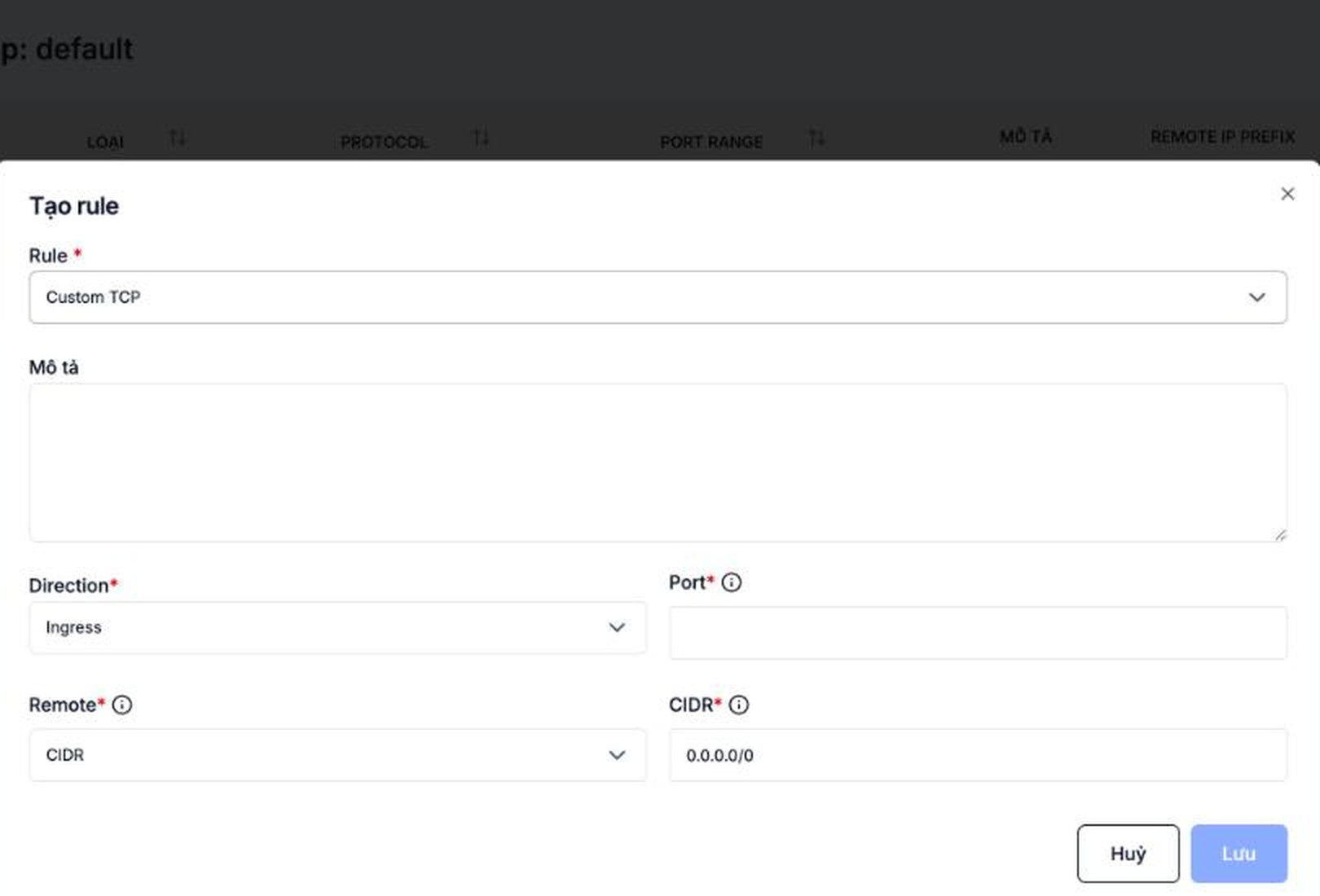
Click + Create rule.

Step 3. Pick a Rule preset
The Rule field is a list of built-in presets — picking the right one auto-fills Protocol/Direction/Port for common services, no need to look up port numbers yourself:
| Rule | Protocol | Direction / Port |
|---|---|---|
| Custom TCP (default) | TCP | Pick Direction + Port yourself |
| Custom UDP | UDP | Pick Direction + Port yourself |
| All TCP | TCP | Pick Direction, applies to every port |
| All UDP | UDP | Pick Direction, applies to every port |
| SSH | TCP | Ingress, port 22 (fixed) |
| HTTP | TCP | Ingress, port 80 (fixed) |
| HTTPS | TCP | Ingress, port 443 (fixed) |
| MySQL | TCP | Ingress, port 3306 (fixed) |
| RDP | TCP | Ingress, port 3389 (fixed) |
| IMAP | TCP | Ingress, port 143 (fixed) |
| POP3 | TCP | Ingress, port 110 (fixed) |
| DNS | TCP | Ingress, port 53 (fixed) |
| ICMP | ICMP | Pick Direction yourself |
Only Custom TCP/UDP show a Port field — and it takes a single port, not a range, even though the rule table's column is labeled "Port range". To open a contiguous range of ports, create separate rules for each, or use All TCP/All UDP to open every port for that protocol.
Step 4. Configure the Remote
| Field | Meaning | Example |
|---|---|---|
| Description (optional) | Note | SSH from office |
| Remote | CIDR or Security Group | CIDR |
| CIDR | Source/destination IP range — only shown when Remote = CIDR | 0.0.0.0/0 or 203.0.113.10/32 |
| Security group | Allow traffic from VMs in another SG — only shown when Remote = Security Group | sg-app-tier |
| IP version | IPv4 or IPv6 — only selectable when Remote = Security Group; when Remote = CIDR, the portal always applies IPv4 | IPv4 |
Click Lưu (Save).
Step 5. Verify the rule
The new rule shows up in the table (the Loại / Type column shows IPv4/IPv6) and applies immediately to every VM that has this SG attached.

Common rule sets
Public web server
| Direction | Protocol | Port | Remote | Purpose |
|---|---|---|---|---|
| Ingress | TCP | 80 | 0.0.0.0/0 | HTTP |
| Ingress | TCP | 443 | 0.0.0.0/0 | HTTPS |
| Ingress | TCP | 22 | <office-IP>/32 | SSH from the office only |
Internal database
| Direction | Protocol | Port | Remote | Purpose |
|---|---|---|---|---|
| Ingress | TCP | 3306 | sg-app-tier | MySQL only from app servers |
| Ingress | TCP | 22 | sg-bastion | SSH only through the bastion |
There is no rule opening 3306 to 0.0.0.0/0 — the database is never exposed to the Internet.
Bastion / jump host
| Direction | Protocol | Port | Remote | Purpose |
|---|---|---|---|---|
| Ingress | TCP | 22 | <office-IP>/32 | SSH from the office only |
Internal VMs then only accept SSH from sg-bastion.
Security recommendations
- Never open
0.0.0.0/0for admin ports (SSH 22, RDP 3389, DB 3306/5432, …) — restrict to specific IPs. - Split Security Groups by tier (web / app / db) — don't dump every rule into a single SG.
- Use a Security Group as the Remote instead of a CIDR for internal traffic — auto-updates when VM IPs change.
- Audit regularly and remove rules you no longer use to shrink the attack surface.
Adding or removing a rule takes effect right away for every VM with the SG attached. Before removing a rule for an admin port (SSH/RDP), make sure you have an alternative channel (Portal Console, another SG covering that port) so you don't lock yourself out.
See also
- Attach Security Groups to a VM — attach/detach the SGs you create.
- Floating IP — public IP that needs the right Security Group to receive traffic.
- SSH/RDP — which ports to open for remote access.